These videos will show anyone working with a Mosaic 51 or Mosaic X how to get up and driving quickly and effortlessly
Check out this series of videos entitled “How to work with the Mosaic cameras.”
Mobile mapping has never been easier. And we’ve got the proof right here. Find out how, with little to almost zero training, you, your colleagues, or the guy next door can unpack, connect, and mount the Mosaic 51 and Mosaic X cameras – 2 of the most powerful and robust mobile mapping cameras to date.
“Remarkably, we required almost no training to use the Mosaic 51 or to instruct our clients in its usage,”
Iwu Emmanuel, Project Manager at Mapersive (part of Geomatic)
Check all of the videos below or access them on YouTube here →
The Mosaic 51 camera (and later the Mosaic X) was built and designed to be a user-friendly, single-man operation.
- No need to have multiple personnel onboard the vehicle during data capture
- No need to have a degree in GIS, surveying, or mapping to operate these cameras
- No need to spend hours, days, or weeks training a new employee
- No need to have a cumbersome, energy-demanding, and complicated computer or workstation within the vehicle
We were able to move the price point of individuals down somewhere in the region of 40%, being able to work like this.
Dan Davis, Catsurveys
These two camera systems were specifically designed to help mapping and surveying companies:
- Quickly and easily capture high-resolution 360º street-view images
- Reduce site visits required by traditional surveying technologies and solutions
- Increase the ‘who’ behind data capture in order to allow senior technicians to work more efficiently
With these videos, you or the driver can learn just how easy it is to operate a Mosaic camera.
Unboxing
First up is the “Unboxing” video. Here you will see what every Mosaic customer gets when they open their newly arrived shipment, straight from Prague (where we have been designing and manufacturing our cameras for several years now).
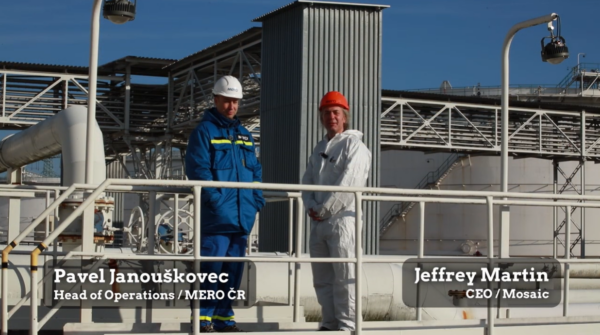
Our CEO, Jeffrey Martin, literally unpacks all of the cables that come in each package and shows you how to connect all of them.
Mounting
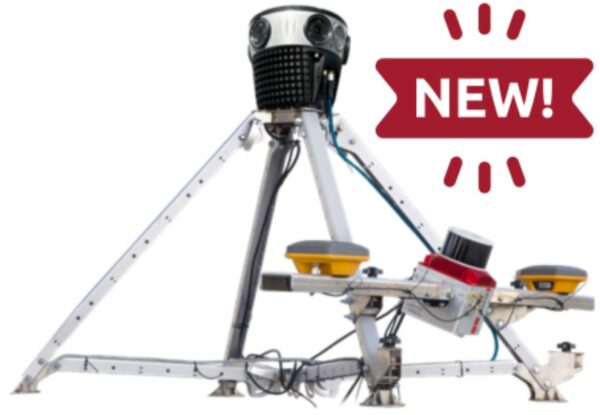
Next up, find out how to mount the world’s only standalone mobile mapping cameras. The Mosaic 51 is only 5 kg (11lbs) and the Mosaic X is only 7 kg (15.4lbs), unlike many other mobile mapping systems. With a simple car roof mount*, anyone can safely secure the camera on the top of the vehicle and make all of the necessary connections:
- GPS antenna
- Ethernet
- Power cable
- Aux port cable (optional)
*Updated December 2023: Mosaic customers are now able to purchase a ‘travel mount’ built by Mosaic engineers for our customers. Contact [email protected] for more information.
WebUI
Third in our ‘How to’ series is the WebUI video. Here, viewers can learn how to work with the Mosaic WebUI, including starting and stopping the recording, getting a GPS fix, and choosing FPS, as well as other parameters.
The most important thing to understand is that you do NOT need a computer in the vehicle and can start and stop the recording of these 360º mobile mapping cameras with only a smartphone, tablet, or laptop.
Mosaic Stitching and Geo-Referencing Tools
Owning your data has numerous benefits, including the ability to choose the software you use! The imagery and LiDAR you capture with Mosaic are compatible with more than 20 software programs, and counting! Rest assured that your data will fit into industry-standard and niche programs.
We also have an in-house Mosaic Processor that allows you to seamlessly transform your source footage into geo-referenced 360° panoramic images. The advanced calibration of camera intrinsics and extrinsics guarantees professional-grade results and smooth integration into your projects. The best part is that even with our own processor, your data is not vendor-locked. So wherever you send it next, you’ll know it converts.
360º Street View Platform
Looking to learn the best way to VIEW your 360º street view images collected with the Mosaic camera?
Check out Mosaic’s most recent collaboration to learn how Mosaic customers can their data into a street viewing platform.
Check all of the videos above or access them on YouTube here →
If you are a Mosaic customer and still need help, don’t hesitate to reach out with any questions to [email protected]